

Meta Description:
Discord Checkpoint is the platform’s first personalized year-in-review feature, similar to Spotify Wrapped. Here’s how it works, what it shows, and how to check your own summary on desktop or mobile.
Discord Checkpoint: The First-Ever Year-End Recap for Your Gaming Life
Discord has finally introduced something its users have been secretly wishing for—Discord Checkpoint, a personalized end-of-year recap that highlights how you spent your time on the platform in 2025. If you’ve ever enjoyed Spotify Wrapped, this new Discord feature will feel familiar. It gives you a clear picture of your gaming habits, your most active servers, and even the friends you talked to the most.
Launched on December 4, Discord Checkpoint marks a special celebration of the platform’s 10th anniversary. While Discord hasn’t confirmed whether this will return every year, it has said that future plans for Checkpoint are still in progress.
What Is Discord Checkpoint?
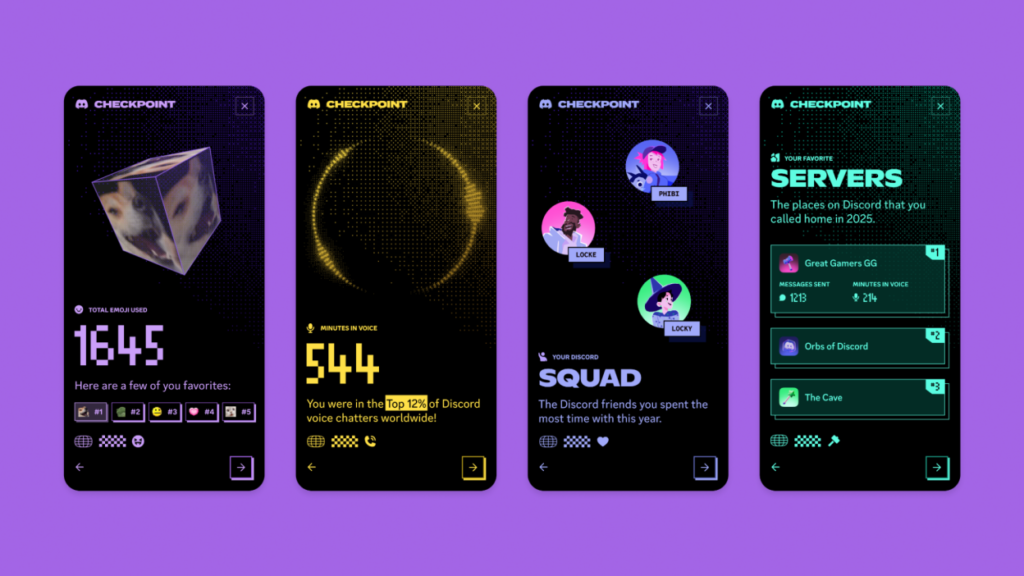
Discord Checkpoint is a personal summary of your activity throughout the year. Once you open it, you’ll see a clean and colorful recap of statistics such as:
- Total hours spent in voice chat
- Your most-talked-to friends
- Your favorite servers
- Most-played games
- Most-used emojis
For many users, these insights feel surprisingly accurate—and sometimes a little too honest. Whether it’s long late-night calls or hundreds of gaming sessions, Checkpoint shows it all.
Who Can Access Discord Checkpoint?
Discord Checkpoint is available only to:
- Users who were active on Discord in 2025
- Users who allowed Discord to personalize their experience in privacy settings
New users or those with very low activity may not get a Checkpoint because the app doesn’t have enough data to create a full summary.
Comparing Discord Checkpoint With Spotify Wrapped
Here’s a simple comparison to help you understand how Discord Checkpoint stands out:
| Feature | Discord Checkpoint | Spotify Wrapped |
|---|---|---|
| Focus | Gaming & chat activity | Music listening habits |
| Launch Year | 2025 | 2016 |
| Sharing Option | In-app share + screenshots | Direct social sharing |
| Availability | Active Discord users only | All Spotify users |
| Extra Reward | Temporary profile frame | Themed graphics & cards |
How to Check Your Discord Checkpoint
Discord makes it easy to access your recap on both desktop and mobile.
On Desktop
- Open Discord
- Look at the top-right corner
- Click the flag icon to open your Checkpoint
You should also get a pop-up when you launch the app.
On Mobile
- Tap the You icon at the bottom
- Click the green Checkpoint banner
- Your recap will open instantly
If you still can’t see it, update your app from the app store.
Extra Bonuses With Discord Checkpoint
Viewing your Checkpoint gives you a temporary decorative frame for your profile picture. You can keep it until January 15. Even users who didn’t qualify for a full Checkpoint can still unlock the frame by attempting to view it.
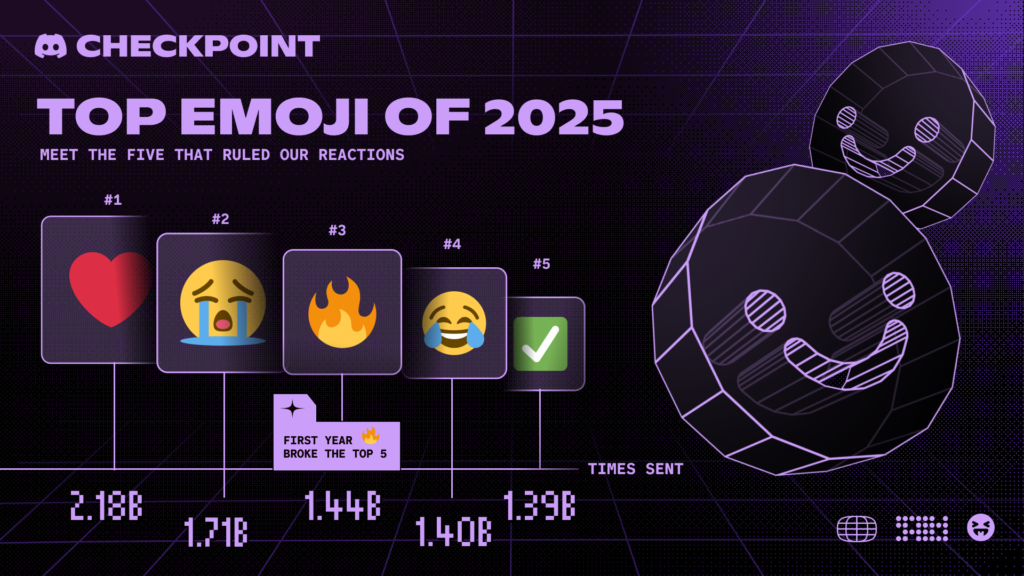
Discord also released a community-wide recap showing how its 200 million monthly users behaved in 2025. League of Legends topped the charts as the most popular game, and the red heart emoji led with a massive 2.18 billion uses.